
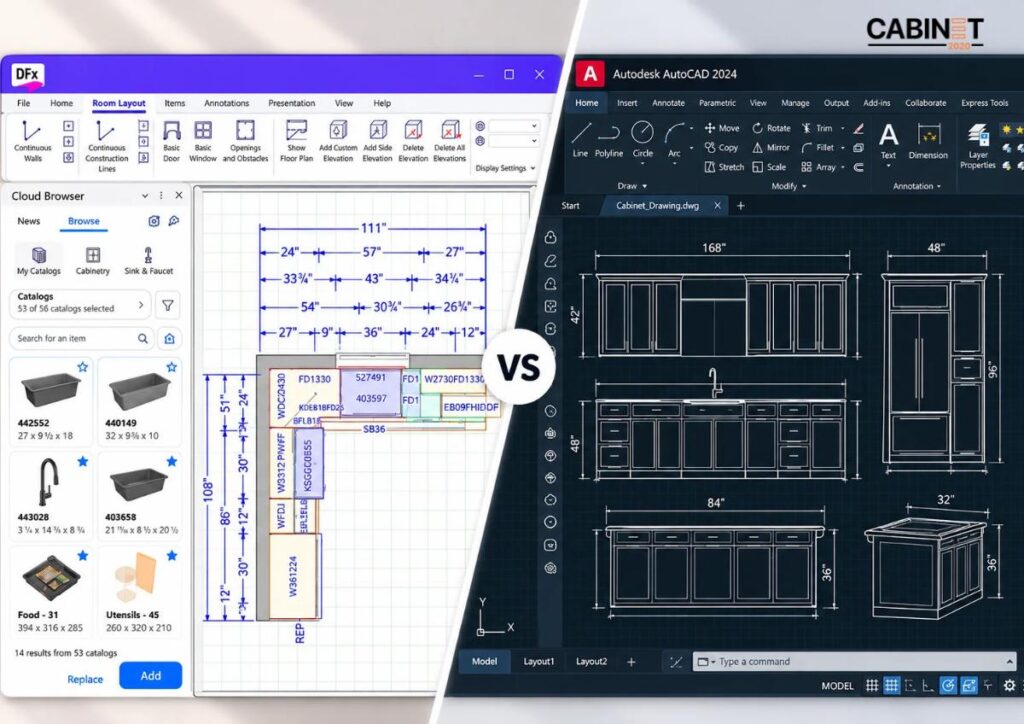
Key Takeaways (TL;DR)
- 2020 Design Flex Software allows you to plan kitchen and bath layouts, supporting manufacturer catalogs, photorealistic visualization, and project coordination
- Flex Cloud enables users to access the design in other locations and allows different team members to collaborate on the project in different locations.
- AutoCAD is better for more specialized custom drafting or cabinet drawings, and can be used for more detailed documentation of your plans.
- Design Flex is a better option for companies that mainly design kitchens and offer many products to clients.
- Design Flex combined with CAD can be a very powerful tool. Using them together with good version control of your drawings is a viable option if you have diverse needs for your projects.
Choosing the right kitchen design software can help businesses manage cabinet layouts, product selection, 3D visualization, and project documentation more efficiently. Design Flex, Cyncly’s evolution of 2020 Design Live, is built for kitchen and bath professionals who need specialized design tools, manufacturer catalogs, realistic visualizations, and cloud-enabled project management.
AutoCAD offers different strengths, particularly for flexible drafting, custom geometry, and detailed technical drawings. For cabinet designers, bath and kitchen dealers, and professional designers, the right choice depends on the required deliverables and how the software fits into the overall workflow.
What Is 2020 Design Flex Software?
2020 Design Flex is Cyncly’s cloud-enabled kitchen and bath design platform and the evolution of 2020 Design Live. It builds on established kitchen design capabilities while adding cloud-based project access, collaboration, and management features.
The software helps kitchen and bath professionals create detailed room designs, work with supported manufacturer catalogs, produce visual presentations, and manage project information. Its capabilities make it particularly relevant to kitchen and bath retailers, cabinet dealers, manufacturers, and remodeling businesses.
Key Features of 2020 Design Flex Software
Explore the key features of Design Flex and how they support efficient kitchen planning, product selection, and design visualization.
Kitchen and cabinet layout planning
With Design Flex, you can design full kitchens and bathrooms. This includes cabinets, countertops, fixtures, and more. Designers can develop plans around project dimensions and requirements while coordinating product selections.
Integrated manufacturer catalogs
Manufacturers’ catalogs integrated with Design Flex software help you browse products for your next design project. Using the Design Flex software allows you to be much more productive by saving your time, effort, and money.
Photorealistic 3D visualization
Design Flex includes advanced rendering capabilities using the Cycles rendering engine to simulate real-world lighting and create photorealistic visuals. Its 360-degree panoramic views help clients and project teams understand proposed designs before implementation.
Cloud-enabled project management
Flex Cloud supports project access, document management, and collaboration across locations. Features include real-time collaboration, synchronized settings, and automatic backups.
Product Information and Reports
Catalog information and reporting tools help teams organize product selections and pricing. These tools rely on catalog availability and configurations.
The 2020 Design Flex software allows businesses that develop design concepts centered on supported cabinets to concentrate these activities in a dedicated space. This prevents them from using generic design programs to do their job.
What Is AutoCAD and How Is It Used in Kitchen Design?
AutoCAD is a general-purpose computer-aided design platform used to create precise 2D drawings, 3D models, dimensions, and technical documentation.
In kitchen and cabinet projects, professionals can use AutoCAD to prepare floor plans, cabinet elevations, sections, custom components, and detailed drawings. Its flexibility is particularly useful when a project involves nonstandard cabinet configurations or established CAD drafting standards.
Key AutoCAD Capabilities:
- Create drawings of kitchens that have dimensions in 2D with layouts, sections, elevations, and technical details.
- Create kitchen cabinets with custom geometries and shapes to fit customer requirements.
- Build drawing blocks for your kitchen designs so that you don’t have to start from scratch every time.
- Managing your drawing dimensions, layers, sheets, and annotations all in one place.
- Create 3D kitchen designs when the customer requires it.
AutoCAD is a capable option for technical drafting. However, kitchen-specific manufacturer catalogs, product selection, and integrated quoting workflows may require additional libraries, applications, or manual setup.
2020 Design Flex Software vs. AutoCAD: Feature Comparison
The distinction in the intended work process is the main difference. Design Flex targets kitchen and bathroom design whereas AutoCAD is more general and has greater drafting and modeling capabilities.
| Comparison factor | Design Flex | AutoCAD |
| Primary purpose | Kitchen and bath design | General-purpose CAD |
| Cabinet placement | Specialized kitchen planning | Flexible drafting and modeling |
| Manufacturer catalogs | Supported integrated catalogs | Typically requires separate libraries |
| 3D visualization | Kitchen-focused photorealistic rendering | 3D modeling with basic rendering |
| Project collaboration | Cloud-enabled project access and management | Depends on the tools and workflow used |
| Product information | Supported catalogs and reporting | Often managed through separate processes |
| Custom technical details | Depends on available design tools | Flexible control over drawing geometry |
| Best suited to | Kitchen planning and product-based design | Custom drafting and technical documentation |
All capabilities listed may vary based on your product version, configuration, and project licensing and needs. The accuracy of estimates and production-ready drawings cannot be guaranteed with either platform.
Why 2020 Design Flex Software is a Better Choice for Kitchen Design?
Designers who focus mainly on kitchen designs, choosing cabinets, and preparing kitchen presentations can benefit from some of Design Flex’s features
Dedicated Kitchen Design Workflows
Design Flex is built around kitchen and bath projects. Designers can work with room layouts, cabinetry, countertops, and other design elements in a dedicated environment.
This is particularly useful for kitchen and bath dealers and cabinet businesses that handle recurring projects and need a consistent approach to planning and presentation.
Access to Manufacturer Catalogs
Supported manufacturer catalogs help designers select available cabinet products and configurations without creating every component manually.
For businesses that regularly specify catalog-based cabinetry, this can simplify product selection and help maintain consistency between the design and the selected products. The benefits depend on catalog coverage and the accuracy of the information being used.
Realistic 3D Kitchen Visualization
Design Flex’s rendering capabilities help present cabinet finishes, materials, lighting, and room layouts in greater visual detail. Realistic presentations can make design reviews clearer and help clients evaluate proposed options.
For businesses requiring additional presentation support, Cabinet2020 also provides professional 3D kitchen renderings.
Cloud-Enabled Collaboration
Once Flex Cloud is activated, Design Flex supports cloud-based access to project information and collaboration across locations. This can help teams coordinate project details, review documents, and manage work without relying exclusively on files stored on a single computer.
The practical benefit depends on how the business configures access, manages revisions, and establishes responsibilities for project updates.
Better Design Information Coordination
The workflow of kitchen design can become much simpler with better organization. Teams can more easily coordinate the kitchen designs, selection, and other project information.
Businesses still need to review specifications of products and other design requirements prior to proceeding with the kitchen project. Design Flex makes it easy to create consistent kitchen designs, but it still requires an in-depth review process.
When Is AutoCAD the Better Fit?
Although 2020 Design Flex Software is the preferred option for kitchen-focused planning, AutoCAD remains valuable when customized technical drafting is the main requirement.
Drafting requirements best served by AutoCAD include:
- Needs for the drafting of custom cabinets outside of standard product configurations.
- Requirements for creating detailed technical drawings and annotations with specific dimensions and notes.
- A library of reusable CAD blocks that supports the business’ standards of drafting.
- Creation of documentation related to custom manufacturing and installations.
- The drafting requirements of a business with an existing database of CAD files that can be built upon.
AutoCAD does not need to replace Design Flex to be useful. Businesses can use each tool for the tasks it handles best, provided the required file formats and information can be exchanged reliably.
How the Right Software Supports an Kitchen Design Workflow?
From Initial Layout to Design Approval
Accurate measurements, appliance specifications, and clear project requirements help designers develop reliable cabinet layouts. A structured process supports consistent revisions and improves design accuracy.
From Approved Design to Technical Documentation
Approved designs may need dimensioned layouts, cabinet shop drawings, countertop details, and estimates. Complete, updated documentation helps teams communicate requirements clearly and reduce discrepancies during production and installation. Well-prepared cabinet shop drawings support this stage of the workflow.
Scaling Design Capacity When Workloads Increase
When project volumes rise, outsourced design support can help cabinet manufacturers and kitchen dealers manage layouts, revisions, renderings, and technical drawings without immediately expanding their permanent in-house team.
Final Thoughts
For catalog-based kitchen and bath design, product selection, and client presentations, Design Flex is the better-suited tool. Its specialized design environment, supported manufacturer catalogs, photorealistic rendering, and cloud-enabled project access make it a strong choice for kitchen and bath businesses.
AutoCAD remains a strong complement for custom drafting and technical details. The two tools serve different purposes and may complement each other when the workflow supports reliable information exchange.
For cabinet manufacturers, kitchen and bath dealers, and builders, the best choice depends on the work that needs to be completed. When kitchen planning and product-based design are central to daily operations, Design Flex deserves priority. When projects require additional technical drafting, AutoCAD can provide a valuable complement.
Cabinet2020 offers project documentation and revision services that meet the specific needs of your business. We make sure that your design information and your revision documents and files are perfectly organized for your team.
FAQs
What is 2020 Design Flex Software used for?
Design Flex is used for kitchen and bath planning, supported manufacturer product selection, photorealistic visualization, and cloud-enabled project management. It is the evolution of 2020 Design Live, with additional capabilities for accessing and coordinating project information.
Is Design Flex better than AutoCAD for kitchen design?
For kitchen and bath design, yes. Design Flex is purpose-built for this work, with supported manufacturer catalogs, photorealistic rendering, and cloud project access. AutoCAD is a general-purpose drafting tool and is better suited to custom technical drawings.
Is Design Flex the same as 2020 Design Live?
Design Flex is Cyncly’s evolution of 2020 Design Live. It builds on established kitchen and bath design capabilities and adds cloud-enabled project access, collaboration, and management features. Existing 2020 Design Live projects can be imported into Design Flex, subject to the supported migration process.
Can AutoCAD be used for kitchen cabinet layouts?
Yes. AutoCAD can create dimensioned layouts, cabinet elevations, sections, and custom technical details. Kitchen-specific libraries or templates may be needed to streamline repetitive drafting tasks.
Can Design Flex and AutoCAD be used together?
Yes, provided the required file formats and exchange methods are supported. Businesses should verify dimensions, revision handling, and documentation standards before using a combined workflow for production projects.