How to Choose a Kitchen Drawing Specialist for Multi-Unit Projects

Key Takeaways (TL;DR)

  • Choose a kitchen drawing specialist with experience managing multi-unit projects, repeated layouts, and unit-specific variations.
  • Assess dimensional accuracy, shop drawing completeness, revision tracking, and production requirements.
  • Confirm software compatibility, file formats, outputs, availability, and the drafting company’s deadlines to see whether they’re a good fit.
  • Assess whether the benefits of drafting in-house outweigh the costs vs. outsourcing.
  • Evaluate a sample and set up a systematic way to get the drawing approved by everyone that will be involved in the project.

When designing kitchens for a multi-unit project, consider more than layouts or the specialist’s service fees. Manufacturers of cabinets and builders of residential or multi-family units also require layouts, project-specific designs, and the flexibility to adjust layouts and designs.

The kitchen drawing specialist you choose must have the drafting expertise and an organized way to support the design and manufacturing teams, reduce revisions, and eliminate time lost.  Evaluate the drawing expertise of the potential drafting partners. Examine how they manage the design and production schedule, and ensure their systems and communication processes align with your standards.

What is a Kitchen Drawing Specialist and What Do They Do?

A kitchen drawing specialist prepares kitchen drawings from a designer’s specifications and the construction plans. They help translate design information into accurate documentation for cabinet production, countertop fabrication, and installation planning.

They provide services including:

  • Cabinet plans using provided dimensions and the building’s floor plans.
  • 2D plans and 3D renderings for design visualization and project coordination
  • Shop cabinet plans including cabinet dimensions, elevations, fillers, and cabinet and panel detail plans.
  • Shop countertop plans including specified materials and fabrication details.
  • Cabinets and countertops estimated for quantity planning and pricing.
  • Making kitchen plan updates for change orders or client change order specifications.

For multi-unit projects, a kitchen drawing specialist also helps maintain consistency across repeated layouts while documenting differences between unit types. Clear deliverables, organized revisions, and defined approval responsibilities help keep design documentation aligned with production requirements

7 Factors to Evaluate Before Choosing a Kitchen Drawing Specialist

1. Experience with Multi-Unit Cabinet Projects

The demand on kitchen drawings for multi-unit projects goes well beyond layout design. The kitchen drawing specialist needs the ability to handle a large quantity of design layouts. A good drawing system will help manage repeated design layouts as well as unique design elements, including design elements from different phases of construction.

You will need to look at designs done for different units types, and how the designs are drawn differently from unit type to unit type, across the units within a project. Ask about how they organize and distinguish drawings from project to project, building to building, and phase to phase.

Experience with repetitive layouts is particularly valuable when a development contains several standard kitchen configurations. A structured approach helps maintain consistency while allowing necessary differences between individual units.

2. Accuracy of Dimensions and Cabinet Layouts

Accurate dimensions are essential for coordinating cabinet layouts with architectural plans, appliance specifications, and available site information. Errors in cabinet widths, clearances, fillers, or appliance placement can result in additional revisions and coordination problems.

Evaluate whether the kitchen drawing specialist follows a structured checking process and identifies missing or conflicting information before finalizing drawings. Ask how dimensions are checked against supplied plans and how discrepancies are communicated to the responsible project team.

Also clarify the limits of the verification process. A kitchen drawing specialist can work from the information provided, but site measurements and final field verification may remain the responsibility of the builder, installer, or another designated professional.

3. Quality and Completeness of Shop Drawings

A kitchen layout communicates the overall arrangement, while shop drawings provide more detailed information for production and installation planning. Depending on the agreed scope, these documents may include cabinet dimensions, elevations, fillers, panels, appliance spaces, and other relevant construction details.

Review sample multi-unit shop drawings to assess clarity, consistency, and completeness. Check whether the documentation follows your team’s preferred conventions and includes the information required for the next stage of work.

Do not evaluate a kitchen drawing specialist solely on the appearance of 3D renderings. Visual presentations can communicate design intent, but technical drawings must also meet the documentation requirements of the cabinet manufacturer or project team.

For countertop work, confirm whether the specialist can provide the agreed details for cutouts, edge profiles, and specified surface materials.

4. Ability to Manage Recurring Layouts and Unit Variations

Standardized layouts can improve efficiency, but multi-unit developments often have some unit types that vary. Variations occur when a kitchen or bathroom is rotated, appliance arrangements are different, or different floor plan types are used. A variation or specialty documenter is needed to identify these differences.

​To gain more understanding, ask the project team how they identify what constitutes a unit type. How do they handle variations in unit layouts that may not occur in other unit types? Ask how they track updates to unit layouts to avoid using old versions. File and drawing naming standards, revision identifiers, and drawing registers can help a project team identify the latest version of a document.

​It is also important to understand how the specialist handles changes that affect several units. A modification to a standard cabinet configuration may need to be reflected across multiple drawing sets, while a change limited to one apartment should not unintentionally alter other layouts.

5. Software and Technical Capabilities

Choose a specialist whose software experience aligns with your existing design and documentation workflow. Depending on your requirements, this may include 2020 Design software, 2D cabinet layouts, 3D rendering, cabinet shop drawings, and software-based cabinet quoting.

Manufacturers already using 2020 Design may benefit from a drafting partner familiar with preparing kitchen layouts and supporting quote estimation within that workflow. However, software familiarity alone does not establish drawing quality or manufacturing readiness.

Confirm the exact deliverables, file formats, compatibility requirements, and level of technical detail before assigning work. If your process includes multi-unit cabinet and countertop estimation, clarify whether quantities, specifications, and related documentation are included in the agreed scope.

​6. Turnaround Time and Production Capacity

A kitchen drawing specialist is defined as one who completes several drawing sets on time and in one instance of drawing set submission, which is not what most project teams should be aiming to do. When reviewing a specialty documenter’s ability, you should ask about team capacity and how they manage a project’s timeline, as well as revision deadlines and how they manage concurrent deadlines.

For multi-building phased construction, ensure drawing submission can happen by building or unit. This way, the project team can line up documentation with the broader project schedule.

Assess project documenters on expected volume as opposed to generalized promises of prompt submission.

7. Communication and Revision Management

Multi-unit projects involve input from architects, builders, cabinet manufacturers, developers, and project managers. Without a clear communication process, approved changes can be missed or applied inconsistently.​

Before starting, establish how the specialist will receive markups, record revisions, identify drawing versions, and communicate unresolved questions. Agree on review responsibilities, approval stages, and the process for distributing updated documents.​

A practical revision process should make it clear what changed, which units are affected, and whether the revised drawings have been reviewed. This helps prevent different stakeholders from working from conflicting versions of the same layout.

​How to Assess a Kitchen Drawing Specialist’s Drawing Workflow

There is great value in a workflow to define expectations and responsibilities for both you and your specialist during the life of a drawing project. You can ask each specialist to detail how they approach the following activities for you to consider how well they fit your workflow.

  1. Review Project Inputs: Consider sharing the drawing inputs, including architectural plans, dimensions, appliance specs, cabinet requirements, and other project details.
  2. First Layouts: Ask each specialist to create layouts based on your project inputs and document for you what information is missing.
  3. Revisions: Once you have the first layouts, ask your specialists to detail how they track and manage your comments on each revision.
  4. Final Deliverables: Finally, ask each specialist to prepare for you their agreed layouts, shop drawings, renderings, and estimation documents.
  5. Drawing Handoff: Ask the specialists to provide you with, for your review, how they intend to hand over final files, how they track approval, and how they use drawing naming and numbering.

When assessing the specialist drawing work, I think the drawing package needs to be evaluated on clarity, drawing record, and whether the deliverables agreed upon have been achieved.

This review provides a more useful assessment than relying on a portfolio image alone. It also helps both parties identify documentation standards before the full project begins.

For manufacturers and builders managing multi-unit cabinet projects, outsourcing can add additional capacity that can complement an existing team rather than replace it. The decision should be based on actual workload, technical requirements, and the ability to maintain consistent drawing quality.

​Common Mistakes to Avoid When Choosing a Kitchen Drawing Specialist

  • Avoid choosing a kitchen drawing specialist based on price alone, as incomplete drawings and repeated revisions can increase overall project costs.
  • Review technical shop drawings, not just 3D renderings, to assess the quality and completeness of the documentation.
  • Check their multi-unit project experience to ensure they can manage repeated layouts, unit variations, and large drawing packages.
  • Establish a clear revision process to prevent inconsistencies between approved layouts and final drawings.
  • Define deliverables, drawing formats, documentation requirements, and approval responsibilities before work begins.
  • Confirm that essential project information, including dimensions, appliance specifications, and cabinet requirements, is available or has a clear process for resolution.

How Cabinet2020 Supports Multi-Unit Projects

Cabinet2020 designs kitchen layouts and prepares cabinet documents for the manufacturers, builders, dealers, remodeling contractors, and multifamily developers across the USA and Canada. We support drawing requirements for various project sizes, including single kitchens, various unit types, and large residential developments.

​Our team supports projects with 2D cabinet layouts, 2020 Design layouts, 3D renderings, multi-unit cabinet shop drawings, countertop shop drawings, and cabinet and countertop estimation. Each service is tailored to the project scope and available specifications.

​We focus on consistent documentation, organized revisions, and clear communication to help streamline coordination across multiple units. Explore our multi-unit cabinet shop drawing services to learn more about our support for larger projects.

​Final Thoughts

When evaluating potential kitchen drawing services, think about accuracy and technical details, quality and management of revisions, software, and turnaround. Find someone who is capable of working with repetitive layouts while retaining some variation within standards across multiple units.

Reviewing sample work is essential, as is gaining a clear understanding of the deliverables and the workflow. The right drawing services provider will help streamline the design process by enabling better information exchange, managing design changes, and allowing teams to focus their efforts on design coordination.

FAQs

What should you look for in a kitchen drawing specialist?

Look for multi-unit project experience, accurate dimensions, complete technical drawings, effective revision management, relevant software capabilities, and the capacity to meet agreed deadlines.

Why are kitchen cabinet drawings important for multi-unit projects?

Kitchen cabinet drawings communicate layouts, dimensions, and relevant construction details. Consistent documentation helps coordinate design decisions and cabinet production requirements across different units.

Can a kitchen drawing specialist handle multiple floor plans?

Yes, provided the specialist has the required capacity and a structured process for managing standard layouts, mirrored plans, unit-specific variations, and revisions.

What drawings are required for multi-unit cabinet projects?

Requirements vary by project. Common deliverables include 2D cabinet layouts, elevations, cabinet shop drawings, and countertop shop drawings. 3D renderings and cabinet or countertop estimates may also be needed.

2020 Design Flex Software vs. AutoCAD: Which Is Better for Kitchen Design?

Key Takeaways (TL;DR)

  • 2020 Design Flex Software allows you to plan kitchen and bath layouts, supporting manufacturer catalogs, photorealistic visualization, and project coordination
  • Flex Cloud enables users to access the design in other locations and allows different team members to collaborate on the project in different locations.
  • AutoCAD is better for more specialized custom drafting or cabinet drawings, and can be used for more detailed documentation of your plans.
  • Design Flex is a better option for companies that mainly design kitchens and offer many products to clients.
  • Design Flex combined with CAD can be a very powerful tool. Using them together with good version control of your drawings is a viable option if you have diverse needs for your projects.

Choosing the right kitchen design software can help businesses manage cabinet layouts, product selection, 3D visualization, and project documentation more efficiently. Design Flex, Cyncly’s evolution of 2020 Design Live, is built for kitchen and bath professionals who need specialized design tools, manufacturer catalogs, realistic visualizations, and cloud-enabled project management.

AutoCAD offers different strengths, particularly for flexible drafting, custom geometry, and detailed technical drawings. For cabinet designers, bath and kitchen dealers, and professional designers, the right choice depends on the required deliverables and how the software fits into the overall workflow.

What Is 2020 Design Flex Software?

2020 Design Flex is Cyncly’s cloud-enabled kitchen and bath design platform and the evolution of 2020 Design Live. It builds on established kitchen design capabilities while adding cloud-based project access, collaboration, and management features.

The software helps kitchen and bath professionals create detailed room designs, work with supported manufacturer catalogs, produce visual presentations, and manage project information. Its capabilities make it particularly relevant to kitchen and bath retailers, cabinet dealers, manufacturers, and remodeling businesses.

​Key Features of 2020 Design Flex Software

Explore the key features of Design Flex and how they support efficient kitchen planning, product selection, and design visualization.

Kitchen and cabinet layout planning

With Design Flex, you can design full kitchens and bathrooms. This includes cabinets, countertops, fixtures, and more. Designers can develop plans around project dimensions and requirements while coordinating product selections.

Integrated manufacturer catalogs

Manufacturers’ catalogs integrated with Design Flex software help you browse products for your next design project. Using the Design Flex software allows you to be much more productive by saving your time, effort, and money.

Photorealistic 3D visualization

Design Flex includes advanced rendering capabilities using the Cycles rendering engine to simulate real-world lighting and create photorealistic visuals. Its 360-degree panoramic views help clients and project teams understand proposed designs before implementation.

Cloud-enabled project management

Flex Cloud supports project access, document management, and collaboration across locations. Features include real-time collaboration, synchronized settings, and automatic backups.

Product Information and Reports

Catalog information and reporting tools help teams organize product selections and pricing. These tools rely on catalog availability and configurations.

The 2020 Design Flex software allows businesses that develop design concepts centered on supported cabinets to concentrate these activities in a dedicated space. This prevents them from using generic design programs to do their job.

What Is AutoCAD and How Is It Used in Kitchen Design?

AutoCAD is a general-purpose computer-aided design platform used to create precise 2D drawings, 3D models, dimensions, and technical documentation.

In kitchen and cabinet projects, professionals can use AutoCAD to prepare floor plans, cabinet elevations, sections, custom components, and detailed drawings. Its flexibility is particularly useful when a project involves nonstandard cabinet configurations or established CAD drafting standards.

Key AutoCAD Capabilities:

  • Create drawings of kitchens that have dimensions in 2D with layouts, sections, elevations, and technical details.
  • Create kitchen cabinets with custom geometries and shapes to fit customer requirements.
  • Build drawing blocks for your kitchen designs so that you don’t have to start from scratch every time.
  • Managing your drawing dimensions, layers, sheets, and annotations all in one place.
  • Create 3D kitchen designs when the customer requires it.

AutoCAD is a capable option for technical drafting. However, kitchen-specific manufacturer catalogs, product selection, and integrated quoting workflows may require additional libraries, applications, or manual setup.

​2020 Design Flex Software vs. AutoCAD: Feature Comparison

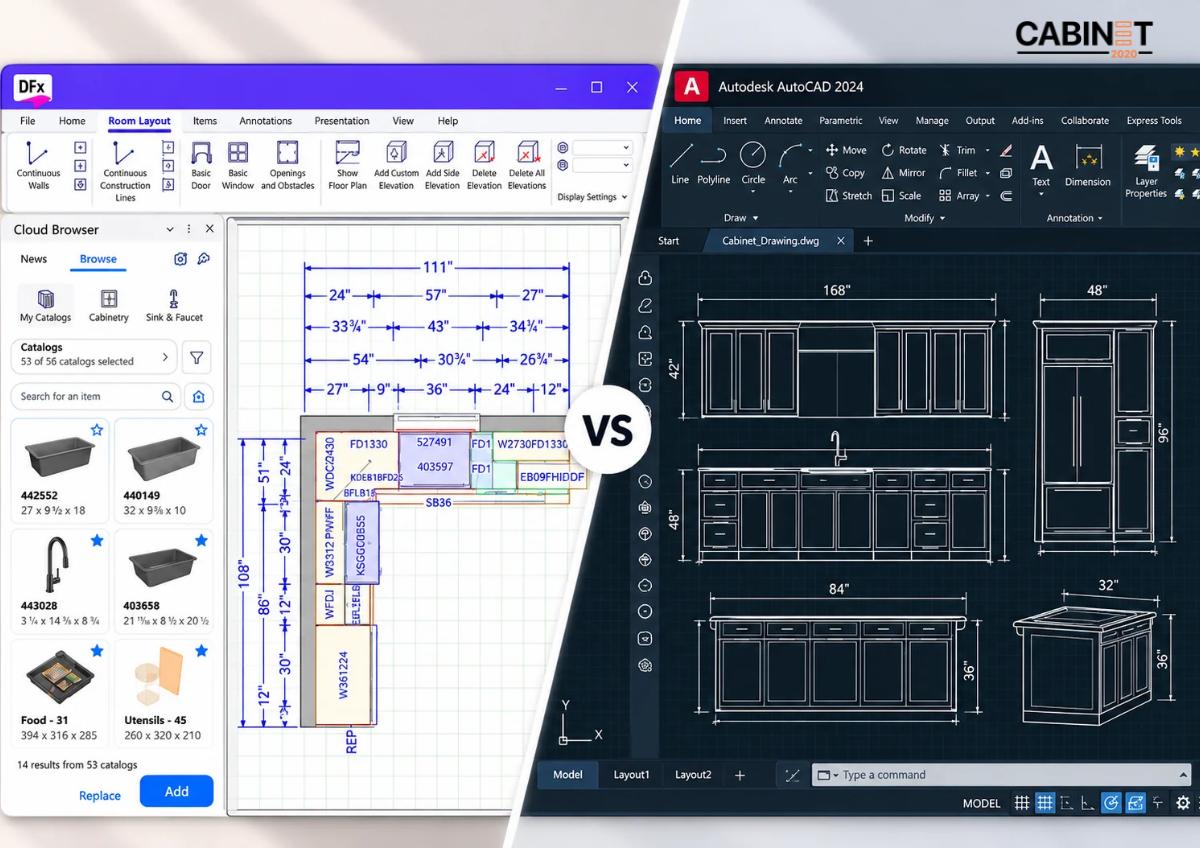
The distinction in the intended work process is the main difference. Design Flex targets kitchen and bathroom design whereas AutoCAD is more general and has greater drafting and modeling capabilities.

Comparison factor Design Flex AutoCAD
Primary purpose Kitchen and bath design General-purpose CAD
Cabinet placement Specialized kitchen planning Flexible drafting and modeling
Manufacturer catalogs Supported integrated catalogs Typically requires separate libraries
3D visualization Kitchen-focused photorealistic rendering 3D modeling with basic rendering
Project collaboration Cloud-enabled project access and management Depends on the tools and workflow used
Product information Supported catalogs and reporting Often managed through separate processes
Custom technical details Depends on available design tools Flexible control over drawing geometry
Best suited to Kitchen planning and product-based design Custom drafting and technical documentation

All capabilities listed may vary based on your product version, configuration, and project licensing and needs. The accuracy of estimates and production-ready drawings cannot be guaranteed with either platform.

Why 2020 Design Flex Software is a Better Choice for Kitchen Design?

Designers who focus mainly on kitchen designs, choosing cabinets, and preparing kitchen presentations can benefit from some of Design Flex’s features

Dedicated Kitchen Design Workflows

Design Flex is built around kitchen and bath projects. Designers can work with room layouts, cabinetry, countertops, and other design elements in a dedicated environment.

This is particularly useful for kitchen and bath dealers and cabinet businesses that handle recurring projects and need a consistent approach to planning and presentation.

Access to Manufacturer Catalogs

Supported manufacturer catalogs help designers select available cabinet products and configurations without creating every component manually.

For businesses that regularly specify catalog-based cabinetry, this can simplify product selection and help maintain consistency between the design and the selected products. The benefits depend on catalog coverage and the accuracy of the information being used.

Realistic 3D Kitchen Visualization

Design Flex’s rendering capabilities help present cabinet finishes, materials, lighting, and room layouts in greater visual detail. Realistic presentations can make design reviews clearer and help clients evaluate proposed options.

For businesses requiring additional presentation support, Cabinet2020 also provides professional 3D kitchen renderings.

Cloud-Enabled Collaboration

Once Flex Cloud is activated, Design Flex supports cloud-based access to project information and collaboration across locations. This can help teams coordinate project details, review documents, and manage work without relying exclusively on files stored on a single computer.

The practical benefit depends on how the business configures access, manages revisions, and establishes responsibilities for project updates.

Better Design Information Coordination

The workflow of kitchen design can become much simpler with better organization. Teams can more easily coordinate the kitchen designs, selection, and other project information.

Businesses still need to review specifications of products and other design requirements prior to proceeding with the kitchen project. Design Flex makes it easy to create consistent kitchen designs, but it still requires an in-depth review process.

When Is AutoCAD the Better Fit?

Although 2020 Design Flex Software is the preferred option for kitchen-focused planning, AutoCAD remains valuable when customized technical drafting is the main requirement.

Drafting requirements best served by AutoCAD include:

  • Needs for the drafting of custom cabinets outside of standard product configurations.
  • Requirements for creating detailed technical drawings and annotations with specific dimensions and notes.
  • A library of reusable CAD blocks that supports the business’ standards of drafting.
  • Creation of documentation related to custom manufacturing and installations.
  • The drafting requirements of a business with an existing database of CAD files that can be built upon.

AutoCAD does not need to replace Design Flex to be useful. Businesses can use each tool for the tasks it handles best, provided the required file formats and information can be exchanged reliably.

​How the Right Software Supports an Kitchen Design Workflow?

From Initial Layout to Design Approval

Accurate measurements, appliance specifications, and clear project requirements help designers develop reliable cabinet layouts. A structured process supports consistent revisions and improves design accuracy.

From Approved Design to Technical Documentation

Approved designs may need dimensioned layouts, cabinet shop drawings, countertop details, and estimates. Complete, updated documentation helps teams communicate requirements clearly and reduce discrepancies during production and installation. Well-prepared cabinet shop drawings support this stage of the workflow.

Scaling Design Capacity When Workloads Increase

When project volumes rise, outsourced design support can help cabinet manufacturers and kitchen dealers manage layouts, revisions, renderings, and technical drawings without immediately expanding their permanent in-house team.

Final Thoughts

For catalog-based kitchen and bath design, product selection, and client presentations, Design Flex is the better-suited tool. Its specialized design environment, supported manufacturer catalogs, photorealistic rendering, and cloud-enabled project access make it a strong choice for kitchen and bath businesses.

AutoCAD remains a strong complement for custom drafting and technical details. The two tools serve different purposes and may complement each other when the workflow supports reliable information exchange.

For cabinet manufacturers, kitchen and bath dealers, and builders, the best choice depends on the work that needs to be completed. When kitchen planning and product-based design are central to daily operations, Design Flex deserves priority. When projects require additional technical drafting, AutoCAD can provide a valuable complement.

Cabinet2020 offers project documentation and revision services that meet the specific needs of your business. We make sure that your design information and your revision documents and files are perfectly organized for your team.

FAQs

What is 2020 Design Flex Software used for?

Design Flex is used for kitchen and bath planning, supported manufacturer product selection, photorealistic visualization, and cloud-enabled project management. It is the evolution of 2020 Design Live, with additional capabilities for accessing and coordinating project information.

Is Design Flex better than AutoCAD for kitchen design?

For kitchen and bath design, yes. Design Flex is purpose-built for this work, with supported manufacturer catalogs, photorealistic rendering, and cloud project access. AutoCAD is a general-purpose drafting tool and is better suited to custom technical drawings.

Is Design Flex the same as 2020 Design Live?

Design Flex is Cyncly’s evolution of 2020 Design Live. It builds on established kitchen and bath design capabilities and adds cloud-enabled project access, collaboration, and management features. Existing 2020 Design Live projects can be imported into Design Flex, subject to the supported migration process.

Can AutoCAD be used for kitchen cabinet layouts?

Yes. AutoCAD can create dimensioned layouts, cabinet elevations, sections, and custom technical details. Kitchen-specific libraries or templates may be needed to streamline repetitive drafting tasks.

Can Design Flex and AutoCAD be used together?

Yes, provided the required file formats and exchange methods are supported. Businesses should verify dimensions, revision handling, and documentation standards before using a combined workflow for production projects.

Digital Marketing for Cabinet Manufacturers: Best Practices for 2026

Key Takeaways (TL;DR)

  • Digital marketing for cabinet manufacturers helps increase online visibility, reach potential buyers, and generate B2B leads.
  • SEO helps cabinet manufacturers appear in relevant search results when buyers look for cabinet products, suppliers, and manufacturing partners.
  • A solid website builds trust. It should list products, show project photos, and make it easy to contact the team.
  • Posting useful content and staying active on LinkedIn lets manufacturers share skills, show what they can produce, and highlight past jobs.
  • Email outreach and paid ads can put the business in front of the right prospects. They also support follow ups after an initial interest.
  • Consistent digital marketing helps cabinet manufacturers expand into new markets and build long-term business relationships.

Digital marketing for cabinet manufacturers is an important part of reaching new customers, building credibility, and generating business inquiries. Referrals and established dealer relationships remain valuable, but manufacturers also need an online presence that helps potential buyers evaluate their products and capabilities before making contact.

Cabinet Dealers, builders, distributors, and teams on commercial projects often compare suppliers based on product range, customization options, manufacturing capabilities, and responsiveness. If your website does not communicate these details clearly, potential customers may struggle to determine whether your business is the right fit.

A practical digital marketing strategy connects your website, search visibility, content, and outreach activities to your sales process.

Why Is Digital Marketing Important for Cabinet Manufacturers?

Cabinet manufacturing is a competitive business, and potential customers need clear reasons to choose one supplier over another. Digital marketing gives manufacturers more opportunities to communicate their capabilities, demonstrate product quality, and stay visible during the supplier research process.

It can support business growth in several ways:

  • Help reach new customers by improving your online visibility.
  • Showcase your products, finishes, and customization options to potential buyers.
  • Build trust by sharing project photos, customer reviews, and product details.
  • Generate business inquiries through your website and online channels.
  • Expand into new markets by reaching buyers beyond your existing network.

Digital marketing is not a stand-in for good service, real relationships, or strong product work. It simply makes it easier for people to notice those strengths and see how to start a project with you.

Best Digital Marketing Practices for Cabinet Manufacturers in 2026

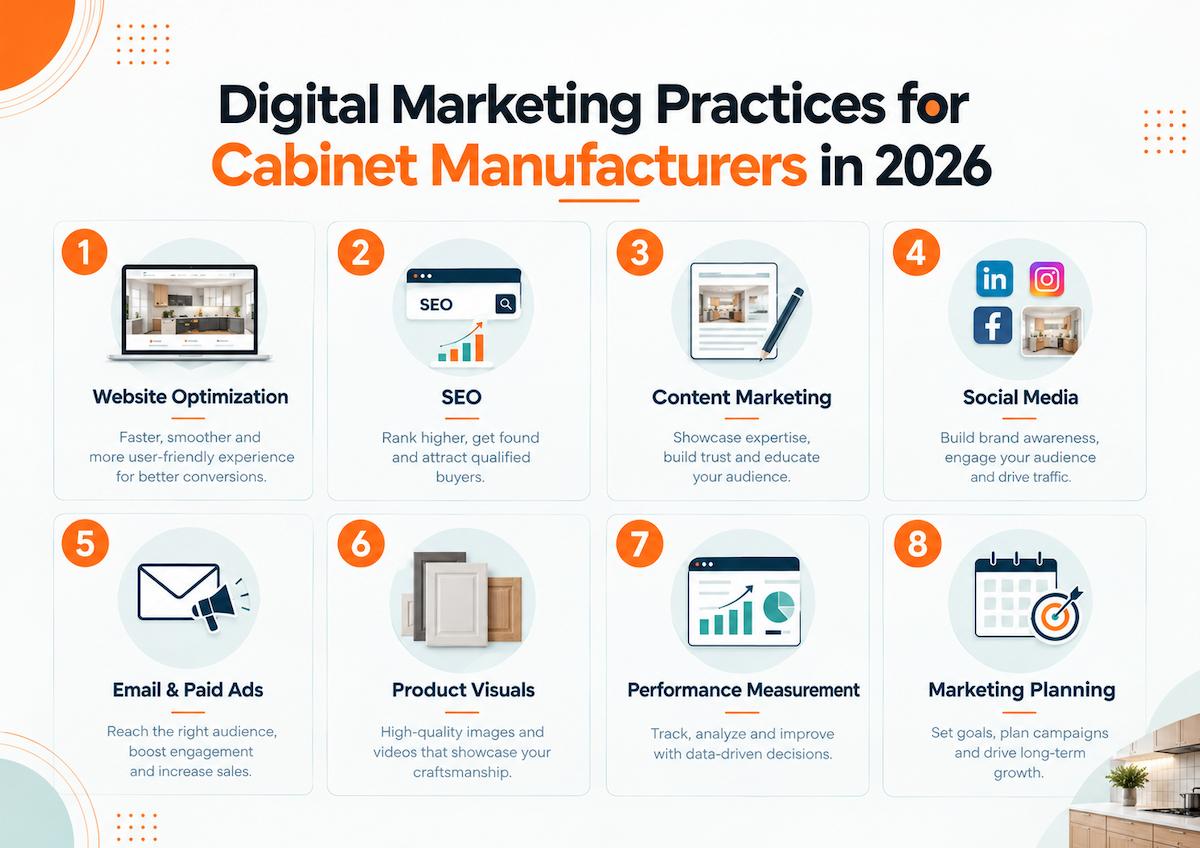
Get an advantage over competitors and grow your online business by using these essential digital marketing tips for cabinet manufacturers in 2026.

Digital marketing practices for cabinet manufacturers in 2026


Build a Website That Generates B2B Leads

Your website should help prospective buyers evaluate your products, manufacturing capabilities, and suitability for their projects. Clearly present cabinet types, materials, finishes, customization options, production capabilities, and the customer segments you serve.

Create dedicated product pages with useful specifications and genuine project photographs. Include certifications and testimonials where available, along with clear options to request pricing, discuss requirements, or contact your sales team. Mobile usability, page speed, and straightforward navigation also matter.

A website should support the sales process rather than simply describe the company. Every important page should answer a buyer’s questions and provide a logical next step.

Improve Search Visibility With SEO

SEO can help cabinet manufacturers show up when people look for cabinets, suppliers, or manufacturing help.  First, figure out the words your buyers type into search. Then make web pages that match those searches.

Focus on these activities:

  • Keyword research: Target relevant commercial phrases related to cabinet manufacturing, custom cabinetry, wholesale cabinets, and specific product categories.
  • On-page SEO: Optimize page titles, headings, meta descriptions, URLs, and image alt text.
  • Technical SEO: Maintain a crawlable website, logical navigation, mobile usability, and appropriate indexing.
  • Internal linking: Connect related product pages, service pages, and articles using descriptive anchor text.
  • Industry authority: Earn relevant links through useful resources, legitimate business partnerships, and industry contributions.

Avoid targeting only broad , highly competitive terms. If you use more specific searches, you can reach people who are actually looking for what you offer.

Review Google Search Console to identify queries generating impressions and clicks, then improve pages that attract relevant visitors but do not generate enough inquiries. SEO should help the right customers find your business, not simply increase website traffic.

The goal of SEO is to help the right customers find you. It is not just about getting more visits.

Use Content Marketing to Demonstrate Expertise

Content marketing for cabinet manufacturers should answer questions that influence supplier selection, product evaluation, and project planning. Rather than publishing generic articles, focus on the issues your customers encounter when purchasing cabinets or coordinating manufacturing work.

Useful content includes:

  • Product guides covering cabinet materials, finishes, construction methods, and customization.
  • Case studies showing completed projects, product specifications, and manufacturing capabilities.
  • Articles explaining ordering requirements, lead times, quality control, and production planning.
  • FAQs addressing minimum order quantities, customization, and delivery expectations.
  • Videos demonstrating manufacturing processes, product details, and quality checks.

For instance, a manufacturer serving commercial projects could publish a guide to planning cabinet orders for multi-unit developments. A supplier working with kitchen dealers could explain how accurate layouts and documentation support project coordination.

Cabinet2020’s article on reducing manufacturing errors provides a relevant example of how technical information can address practical production concerns.

Use Social Media Platforms for Visual Content

Social media can help cabinet manufacturers present their products and develop relationships with potential business customers. Choose platforms based on your target audience and the type of information you need to communicate.

  • LinkedIn: Connect with cabinet dealers, builders, distributors, purchasing managers, and commercial project decision-makers.
  • Instagram: Showcase cabinet finishes, product details, completed installations, and project photographs.
  • YouTube: Publish factory tours, product demonstrations, and manufacturing process videos.
  • Facebook: Share product updates, company news, project photographs, and relevant customer feedback.

LinkedIn is a strong pick for B2B marketing. The Content marketing institute ran B2B research. In that study, 85% of the B2B marketers considered LinkedIn the social platform delivering the best value of their organization.

Post your content on a steady schedule and participate in relevant industry discussions. Track whether your activity produces meaningful conversations and qualified inquiries instead of judging performance solely by likes or follower counts.

Get Leads With Email Outreach and Paid Ads  

Email outreach and paid ads can support SEO. They help cabinet makers reach the right buyers faster.

Email work works best when you group contacts first. Sort them by industry, site, product needs, and buying role. Send content that fits each group. Include key product details, your plant strengths, and a few project samples. If you do direct B2B outreach, write messages that match the lead. Also follow the email rules and privacy steps that apply. When you follow up, keep the tone polite and business like.  

Paid ads can also bring in buyers who are already looking. Focus on these options:  

  • Google Search Ads for high intent searches  
  • LinkedIn ads aimed at the right job titles and sectors  
  • Retargeting when it is allowed and makes sense  
  • Landing pages that push users to request a quote  

Track what matters. Watch qualified inquiries, conversion rates, cost per qualified lead, and the sales that follow. Ads that pull a lot of clicks but attract few real buyers may be weaker than ads that bring less traffic but more qualified requests. 

Use Product Visuals and Technical Content to Support Sales 

Product visuals help potential buyers evaluate cabinet configurations, finishes, and customization options before discussing a project. Combine accurate product photography with drawings and 3D visuals when they help communicate specifications or proposed layouts. 

When it makes sense, add clean drawings and simple 3D views too. This can make measurements and proposed floor layouts easier to understand.

For example, photorealistic 3D renderings can communicate proposed kitchen configurations, while accurate technical documentation helps teams coordinate design requirements with manufacturing processes.

Manufacturers, dealers, and builders should also consider how layouts, shop drawings, and estimation support fit into their workflows. When project volumes increase or internal teams face a drafting backlog, external design and documentation support can provide additional capacity without immediately expanding permanent staffing.

Measure Results and Refine Your Strategy

Digital marketing requires regular measurement. Establish a baseline, track meaningful outcomes, and adjust your approach based on the results.

Monitor these metrics:

  • Track organic search impressions, clicks, relevant search queries, and qualified website visits.
  • Monitor quote requests, contact form submissions, and qualified business inquiries.
  • Measure relevant email replies, meetings booked, and sales opportunities.
  • Evaluate paid advertising through cost per qualified lead and conversion rates.
  • Track new customers, sales opportunities, and attributable revenue where measurement is reliable.

Review performance monthly and identify which channels attract the most relevant prospects. A campaign that generates fewer inquiries may still deliver better business results if those inquiries come from qualified dealers, distributors, or commercial buyers.

Create a Practical Digital Marketing Plan for 2026

Cabinet manufacturers do not need to implement every marketing channel at once. Start with the activities most likely to address your current business needs.

  1. Audit your website, product pages, and quote-request process.
  2. Prioritize relevant commercial keywords and improve core pages.
  3. Publish useful articles, product guides, and genuine project examples.
  4. Develop a consistent LinkedIn presence and targeted B2B outreach process.
  5. Test paid campaigns when conversion tracking and lead follow-up are ready.
  6. Review results monthly and invest in channels that produce qualified opportunities.

A focused plan makes it easier to manage resources, measure progress, and improve marketing activity over time.

Final Thoughts 

Digital marketing helps cabinet makers most when a few parts work together. You want your site updates, search presence, helpful posts, outreach to the right people, and reporting to all match the same goals. What you do next will depend on what you sell, who buys, how long sales take, and what time and money you can spare.

Start with a website that shows what you can do in a clear way. Then work on getting found for the searches that matter. Use content and direct outreach to talk with people who might buy. Keep an eye on the results. Adjust your plan based on whether the leads you get are actually worth your time.

For manufacturers and dealers that also need additional kitchen design, drafting, rendering, or estimation capacity, explore Cabinet2020 services for production-focused support across the USA and Canada.

FAQs

How do cabinet manufacturers market their businesses online?

Cabinet manufacturers can use a professional website, SEO, educational content, LinkedIn, targeted email outreach, and paid advertising to reach prospective dealers, builders, distributors, and other business buyers.

Which digital marketing channels work best for cabinet manufacturers?

The best channels depend on the target audience, product category, sales cycle, and budget. SEO supports long-term discovery, while targeted outreach and paid search can help reach relevant buyers more directly.

How can cabinet manufacturers generate more B2B leads?

Improve product and capability pages, target relevant commercial searches, showcase genuine projects, and provide straightforward quote-request options. Follow up promptly and track which sources produce qualified inquiries.

How long does digital marketing take to produce results?

Paid advertising can generate traffic soon after launch, while SEO and content marketing generally require sustained effort. Results depend on competition, website quality, budget, content relevance, and the effectiveness of the sales process.

Cabinet Design Outsourcing vs. In-House Design: What Fits Your Business?

Key Takeaways (TL;DR)

  • Cabinet Design Outsourcing adds flexible capacity without the commitment of hiring another full-time designer.
  • In-house design works best for businesses with consistent workloads and a need for close daily collaboration. 
  • Cabinet fits well when you have multiple tasks, uneven demand, or extra rounds of edits. It also helps with drafting and extra overflow work.  
  • In-house and outsourced design can work together, allowing businesses to keep the core expertise while outsourcing specific tasks.
  • The right model depends on workload, cost, turnaround, internal expertise, and capacity needs. 
  • When you outsource cabinet design, you may get 2D layouts and 3D renderings, along with 2020 Design quoting and estimations.
  • Choosing an outsourcing partner required evaluating cabinet industry experience, software expertise, documentation quality, and communication. 
  • Cost should be evaluated beyond salary, including recruitment, training, software, equipment, and other employee-related overhead.

U.S. cabinet manufacturers, dealers, builders, and remodeling businesses, deciding how to handle design work is not simply a choice between hiring  a designer and outsourcing the work.

The best path depends on project volume, turnaround expectations, internal expertise, cost and workflow.

An in-house designer can help when the work stays steady and when close daily coordination matters. Cabinet Design Outsourcing can help more when the schedule swings, project numbers rise, or your in-house team ends up doing too much work that should be handled during production.

What Is Cabinet Design Outsourcing?

Cabinet design outsourcing means assigning some or all cabinet design and documentation tasks to an external design team.

A business might send an entire work to an external team. It might also send only certain steps. Common steps include:

  • 2D cabinet layout work  
  • Cabinet design revisions 
  • Photorealistic 3D rendering
  • 2020 Design-based quoting.
  • Shop drawings for cabinets. 
  • Shop drawings for countertops.  
  • Cabinet and countertop takeoff and estimates .
  • Documentation for multi-unit projects. 

The business does not necessarily have to transfer its entire design process. Client-facing choices and day to day project work can stay in-house while the production and document tasks chosen by the company are outsourced.

For manufacturers, 2D layouts can improve production planning by giving teams a structured view of cabinet requirements before production begins.

Cabinet Design Outsourcing vs. In-House Design

No single option wins every time. Each has advantages depending on how a cabinet business operates.

Factor In-House Design Outsourced Design
Daily collaboration Direct interaction Requires defined communication
Company-specific knowledge Builds naturally Requires onboarding
Capacity Limited to employees Can scale with workload
Hiring Recruitment and onboarding required No direct employee hiring
Workload changes Can create overload or idle capacity Easier to adjust
Internal control Highest direct control Managed through processes and reviews
Employee overhead Salary, benefits, equipment, etc. Service or project-based cost
Overflow work Limited by internal capacity Additional project support
Long-term expertise Strong internal knowledge Depends on the relationship

When In-House Design Works Better

An in-house designer can be the better option when design work is consistent and predictable.

For example, a cabinet manufacturer processing a steady stream of projects may benefit from a dedicated designer who understands its product catalog, construction methods, pricing structure, and internal approval process.

In-house design can also be advantageous when:

  • Designers work closely with sales every day.
  • Projects require frequent internal discussions.
  • The company has a stable year-round workload.
  • Product and process knowledge is highly specialized.
  • The business wants to build permanent internal expertise.

In these situations, outsourcing does not necessarily need to replace the internal design function.

When Cabinet Outsourcing Design Works Better

Outsourcing becomes more attractive when a business needs flexible capacity rather than another permanent position.

This can happen when:

  • Project volume changes significantly.
  • Internal designers have a growing backlog.
  • Revisions are consuming too much designer time.

The key distinction is simple: hiring adds permanent internal capacity, while outsourcing can add capacity when the business needs it. The business is taking on larger projects.

  • Qualified designer recruitment is difficult.
  • Additional drafting or documentation support is needed.
  • Temporary workload increases do not justify permanent hiring.

Why Do Businesses Consider Cabinet Design Outsourcing?

Cost is one consideration, but capacity and turnaround are often equally important.

1. Mange Design Backlogs 

A busy sales pipeline can lead to slowdowns.  While in-house staff work on current builds, new clients may still wait for plans, updated drawings, render views, or pricing.

Outsourcing selected tasks can help to reduce that backlog without immediately expanding the internal team.

2. Add Capacity Without Immediate Hiring

Hiring a full-time designer involves more than salary. Businesses may also have recruitment, onboarding, training, equipment, software, and ongoing employee costs.

That investment can make sense when workload is consistently high. When demand is uncertain, outsourcing can provide additional support without building permanent capacity around temporary peaks.

3. Free Internal Designers for Higher-Value Work

Internal designers may spend significant time on repetitive drafting, revisions, documentation, and quote preparation.

Some of these tasks can be delegated while internal staff remain focused on customer discussions, design decisions, product selection, and approvals.

For businesses already using 2020 design software, working with a partner familiar with the software can make this type of delegation easier to integrate into the existing workflow.

4. Handle Fluctuating Project Volume

Cabinet businesses rarely have perfectly consistent workloads. Remodeling contracts, multi-unit developments, seasonal demand, or large projects can create temporary increases.

Outsourcing allows businesses to respond to these changes without treating every workload increase as a reason to hire another permanent employee.

Cost and Capacity: What is The Real Gap?

A financial decision should go beyond comparing an employee’s salary with an outsourcing fee.

An in-house designer can involve:

  • Payroll and salary
  • Benefits
  • Hiring and recruitment
  • Training
  • Tools, equipment, and software
  • Management time
  • Paid downtime
  • Replacement costs

Outsourcing generally has a different cost structure because the business pays for an agreed service or project rather than maintaining another employee position.

However, outsourcing is not automatically cheaper in every situation. If a business has enough consistent work to keep a full-time designer productive throughout the year, an in-house position may provide better long-term value.

The financial advantage of outsourcing is often stronger when the business needs variable capacity rather than permanent capacity.

Situation Potentially Better Fit
Consistent full-time design workload In-house
Temporary workload increase Outsourcing
Frequent design backlog Outsourcing
Stable need for internal collaboration In-house
Variable project volume Outsourcing
Permanent product knowledge In-house
Difficult designer recruitment Outsourcing
Additional drafting during peak periods Outsourcing

The decision should therefore be based on capacity utilization, not simply the lowest apparent cost.

What Should You Look for in a Cabinet Design Outsourcing Partner?

Once a business decides to outsource, choosing the right provider is important. Price should not be the only selection criterion because cabinet design connects directly with quoting, manufacturing, and installation.

Cabinet Industry Experience

The provider should understand cabinet terminology, layouts, dimensions, revisions, product specifications, and the relationship between design and production.

Software Experience

If your business uses specific software, confirm that the outsourcing team understands the software and can follow your catalogs, standards, file requirements, and quoting workflow.

Production-Ready Documentation

A customer-facing 3D rendering serves a different purpose from a shop drawing used for production. 

For manufacturers dealing with increasing documentation requirements, outsourcing cabinet shop drawings can provide additional production support without adding another permanent design position.

Clear Workflow and Communication

Before starting, establish:

  • Required project inputs
  • Product catalogs and standards
  • File formats
  • Revision procedures
  • Turnaround expectations
  • Approval process
  • Final deliverables

A structured process reduces unnecessary revisions and makes an external design team easier to manage.

Capacity for Ongoing Support

If outsourcing is intended as a long-term solution, evaluate whether the provider can support normal workloads as well as periods of increased demand.

How to Decide Which Model Fits Your Business

The decision ultimately comes down to the type of capacity your business needs.

Choose or maintain an in-house design team when:

  • Workload is consistently high.
  • Designers need frequent internal interaction.
  • Product knowledge is highly specialized.
  • The business wants permanent design expertise.
  • Internal capacity can remain consistently utilized.

Consider Cabinet Design Outsourcing when:

  • Workload fluctuates.
  • Your team has a growing backlog.
  • You need additional capacity without another full-time hire.
  • Designers are spending too much time on repetitive production tasks.
  • Recruitment is taking too long.
  • You need support for a specific design or documentation function.
  • Projects exceed current internal capacity.

There is also no requirement to make the decision completely one-sided. A company can retain its core internal design function while outsourcing specific production tasks when workload increases.

The important question is whether the current design structure can deliver the required quality and turnaround without creating unnecessary capacity constraints.

Final Thoughts  

No one cabinet layout system fits every business. Some companies do well with in-house designers. They can work closely with other teams and build deep product know-how over time. This works best when the workload stays steady and hiring a permanent design group makes sense.  

Still, business needs shift. When new projects come up, backlogs grow, or the team gets pulled into production work, it can slow down design output. Cabinet design outsourcing can help in those moments. It adds room to move without forcing an immediate increase in the core staff.  

The right partner matters. Look for a firm that understands cabinet workflows, uses the needed software tools, and follows clear documentation rules. You also want delivery that stays accurate and focused on real production needs.  

Cabinet2020 supports customers across the USA and Canada with 2D cabinet layouts, 3D rendering, 2020-based quoting, shop drawings, and cabinet and countertop estimation providing additional design and documentation capacity when internal teams need it.

FAQs

Is Cabinet Design Outsourcing better than hiring an in-house designer?

Not in every situation. Outsourcing is often more suitable for flexible capacity, overflow support, or additional production resources. If your business has steady work and you need design help every day with quick meetings, an in-house designer can be a good fit.

What cabinet design tasks can be outsourced? 

Businesses can outsource 2D cabinet layouts, 3D renderings, design revisions, 2020-based quoting, cabinet shop drawings, countertop drawings, and cabinet or countertop estimation.

When should a cabinet business consider outsourcing?

Consider outsourcing when design backlogs are increasing, internal designers are overloaded, workloads fluctuate, recruitment is difficult, or additional production capacity is needed without immediately adding permanent staff.

Can outsourced designers work with 2020 Design?

Yes. Businesses should confirm that the outsourcing provider has experience with 2020 Design and can follow their existing catalogs, standards, file requirements, and quoting workflow.

How can a business start outsourcing cabinet design?

Start with one clearly defined workflow or project. Establish the required inputs, deliverables, turnaround, revision process, and approval procedure. A sample project can then help determine whether the external team fits the business’s standards.